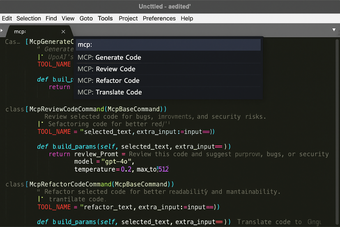
MCPHelperSublimePlugin: a Sublime bridge for Model Context Protocol
MCPHelperSublimePlugin by Sdirishguy integrates the Model Context Protocol into the Sublime Text editor, letting developers connect their editor to MCP-compliant services for in-editor assistance. It provides editor hooks and quick command access so external models and tools can operate on project files and metadata. The plugin targets Sublime Text users who want to experiment with AI-assisted coding workflows and prefer a lightweight, community-driven extension that keeps editor control local.
What tasks can you actually use it for?
The plugin functions as a client for MCP servers and lets models act on code-focused inputs, so you can use it to forward open file contents and project metadata to external agents. Command execution from the editor enables model-triggered operations and tool runs, while dynamic tool discovery exposes server-provided capabilities inside the editor. These behaviors support code edits, automated refactors, and model-driven analysis when a compatible server is available.
Does it require technical setup and how is configuration handled?
Expect manual configuration: servers are defined in a JSON settings file where you list the command, arguments, and environment variables for each connection. Installation options include cloning into the Packages directory or using Package Control if present. The plugin supports Sublime Text 3 and 4 across Windows, macOS, and Linux. Configuration steps typically require editing JSON and verifying the server command runs correctly.
What should users expect about data flow and operational limits?
The plugin does not bundle an AI model; it acts as a client that sends editor data to an external MCP-compliant server, so model execution and storage happen outside the editor. Its open-source codebase allows examination of how data is passed to servers. Community feedback shows adoption mainly among power users who accept external server setup and manual validation of model outputs.
Best suited to technical users who run or access MCP services
The plugin is a practical choice for Sublime Text developers who already operate or can deploy MCP-compliant servers, and who want an unobtrusive editor-side bridge. Because it depends on external model hosts and manual server configuration, it fits early adopters and development teams prepared to validate model outputs rather than users seeking a plug-and-play AI inside the editor.
Pros
Open-source codebase allows community review and contributions
Supports Sublime Text 3 and 4 on Windows, macOS, and Linux
Exposes editor content and project metadata to MCP workflows
Cons
Requires an external MCP-compliant server to function
Server connections configured via JSON, needing manual edits
No bundled AI model; models run on external servers
Laws concerning the use of this software vary from country to country. We do not encourage or condone the use of this program if it is in violation of these laws. Softonic may receive a referral fee if you click or buy any of the products featured here.